

Setup Steps
Step 1: Install Smart IPTV
Download Smart IPTV from your TV’s app store (Samsung Apps or LG Content Store). Note: The app has a one-time fee of approximately €5.49.
Step 2: Find Your MAC Address
Open the Smart IPTV app. Your device’s MAC address will be displayed on screen. Write this down.
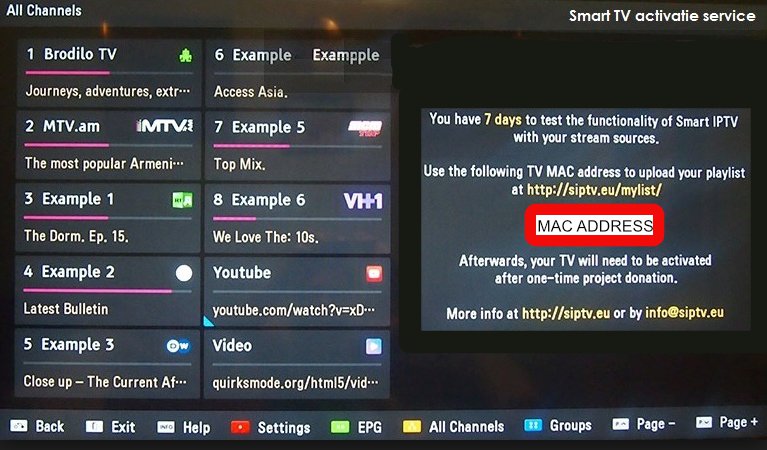
Step 3: Visit the Upload Page
On your computer or phone, go to https://siptv.app/mylist/ to access the playlist upload page.
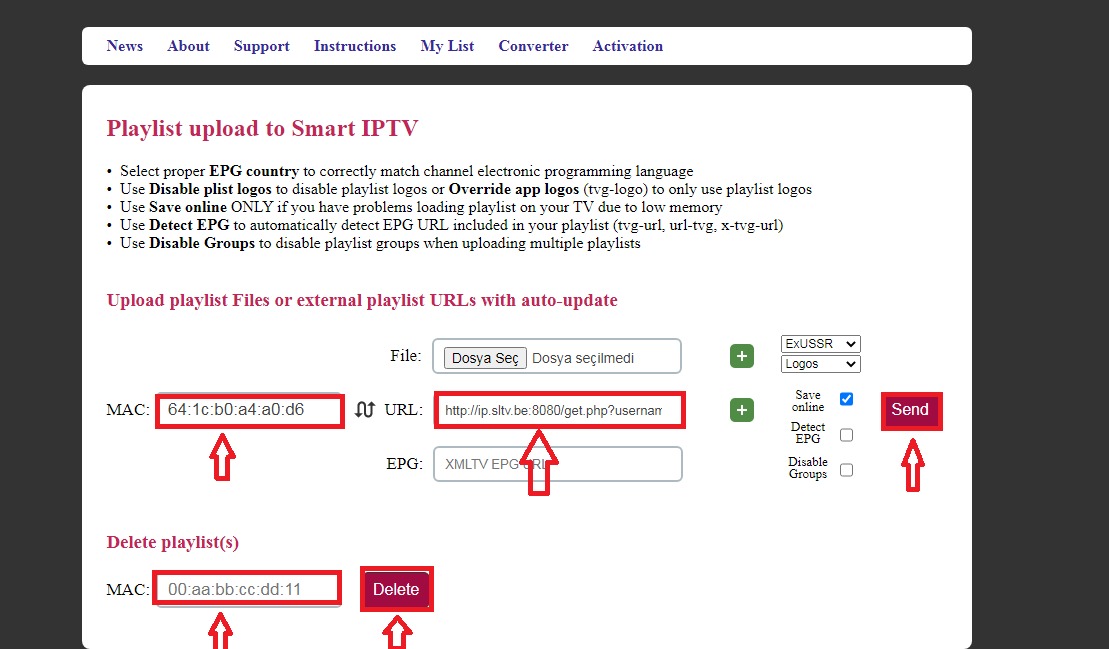
Step 4: Upload Your Playlist
Enter your MAC address and paste the M3U URL from your World Media Server welcome email. Click Send to upload.
Step 5: Restart the App
Go back to your TV and restart the Smart IPTV app. Wait for the channels to load completely before pressing any buttons.
Note: Do not press any buttons on your remote control until the loading screen is complete.
Tips
- If channels don’t appear, try removing and re-adding the playlist
- Use the Keep online feature for faster loading times
- The app remembers your last watched channel